

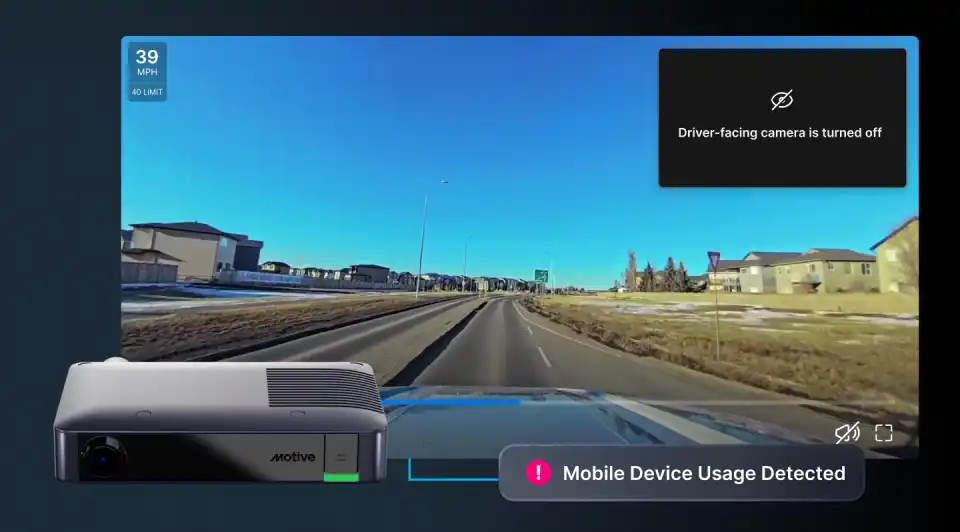
Driver privacy is core to building trust and retaining drivers. Motive’s dual-facing AI Dashcams help prevent accidents and keep drivers safe, but how video is captured and used should also reflect your drivers’ privacy expectations and your organization’s requirements.
That’s why you need flexible controls that balance safety with privacy, giving drivers confidence their privacy is respected.
Expanded Driver Privacy Mode options
With Driver Privacy Mode (AI On), get accurate AI-powered safety insights while preserving privacy. AI detects unsafe driver behaviors like mobile device usage, drowsiness, and seat belt violations without any storage of driver-facing video. Drivers still receive in-cab alerts, and safety events appear on the Motive Dashboard without driver video for coaching. You can fully customize the alerts and control driver-facing recording. Available on AI Dashcam Plus.
These new settings build on existing Driver Privacy Mode features, which already give you the flexibility to control when and how the driver-facing camera operates, while the road-facing camera continues to record.
- Off while idling – Disable the driver-facing camera after three minutes of idling, letting drivers take a break while keeping the vehicle running for heating or air conditioning.
- All cameras off while idling – Turn off both driver- and road-facing cameras when the vehicle is idling. This is especially useful at job sites where recording isn’t allowed but the vehicle must stay running to power equipment or provide heating or cooling for workers. Available for AI Dashcam, coming soon to AI Dashcam Plus.
- Off when engine is off – Disable the driver-facing camera when the vehicle is off, safeguarding privacy during breaks or off-duty periods.
- Always off – Keep the driver-facing camera disabled at all times for vehicles where in-cab video isn’t needed, such as when easing drivers into dash cam adoption.
- Always on (default) – Enable video recording and AI detections on both the driver-facing and road-facing cameras.